
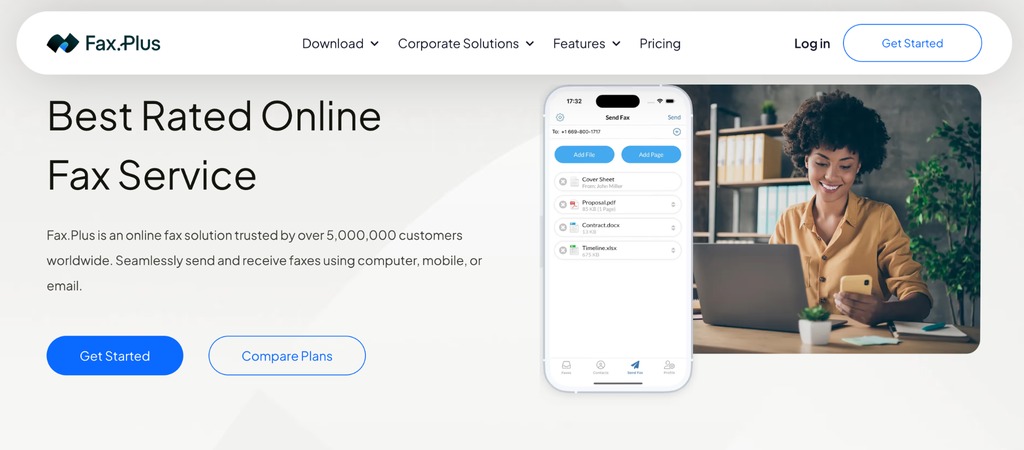
Fax.Plus is a cloud-based online fax service that lets individuals and businesses send and receive documents without a physical fax machine or dedicated telephone line. It combines browser-based faxing, mobile applications, email integration and tools for managing business communications in one account.
Whether you need to send an occasional document or replace an entire office fax system, Fax.Plus offers several subscription options. This review examines its features, pricing, security and practical limitations to help you decide which plan is right for you.
About Fax.Plus
Fax.Plus is developed by Alohi, a Swiss technology company based in Geneva, alongside products including Sign.Plus for electronic signatures, Scan.Plus for mobile document scanning and Dial.Plus for business telephony. Its approach is to modernize document and communications workflows without requiring traditional office hardware.
The platform caters to individuals, small businesses and larger organizations, including teams in healthcare, legal services, finance and real estate that still exchange documents by fax.
How Fax.Plus Works
- Create an account: Sign up online or through the mobile app. Paid plans include a dedicated fax number for receiving documents.
- Attach your files: Select the documents or images you want to send, and add an optional cover sheet.
- Enter the recipient: Specify the destination fax number, including the appropriate country code.
- Send and track: Submit the fax and check its transmission report to confirm delivery or identify a failed attempt.
- Receive and organize: Access incoming documents through your account and manage your fax history digitally.
The advantage is that you can keep documents in a central online archive instead of relying on paper copies. The service also supports multiple recipients, which can be useful when distributing the same document to several offices.
Top Features of Fax.Plus
Online Faxing and Dedicated Fax Numbers
Fax.Plus provides a web dashboard for sending, receiving and managing faxes. Paid subscribers can obtain a dedicated number, with local and toll-free options depending on the destination and plan. Premium and higher plans also support eligible number transfers, allowing businesses to keep an existing fax number without changing their contact details.
Delivery reports help distinguish a successfully transmitted fax from a submission that is still pending or has failed. International destinations may have different page-charging rules, so it is worth checking the sending rates before transmitting a large document.
Email to Fax
Users can send a fax from their registered email address by attaching a document and addressing the message to the recipient’s fax number using the Fax.Plus email-to-fax format. This is particularly useful for office teams that spend most of their day in Gmail or Outlook. Incoming fax notifications and document forwarding options can also simplify workflows, subject to the account’s security configuration.
Mobile Apps and Desktop Printing
The iOS and Android apps make it possible to manage faxes from a smartphone or tablet. Users can capture paper documents with the camera, attach digital files and check delivery status away from the office.
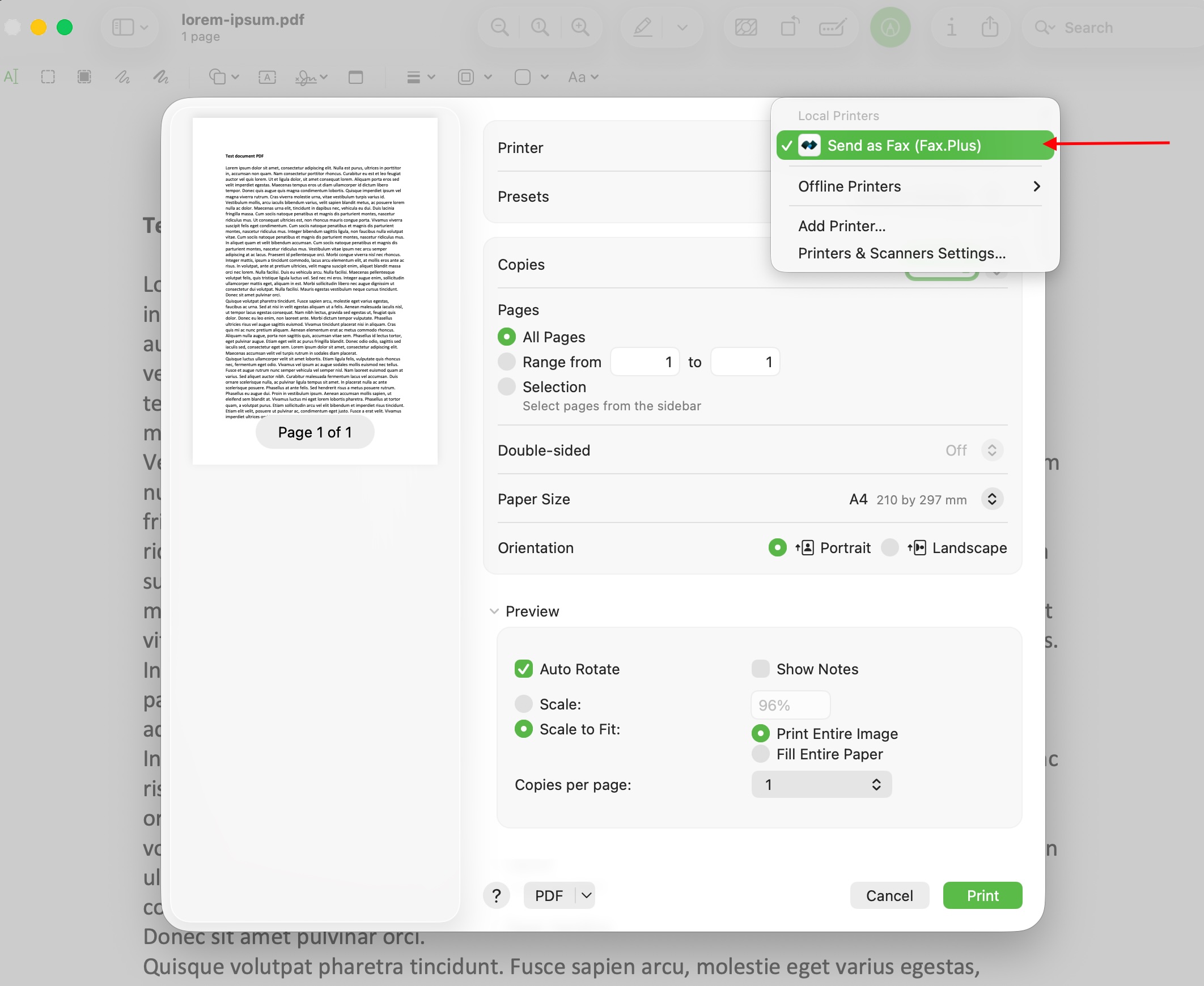
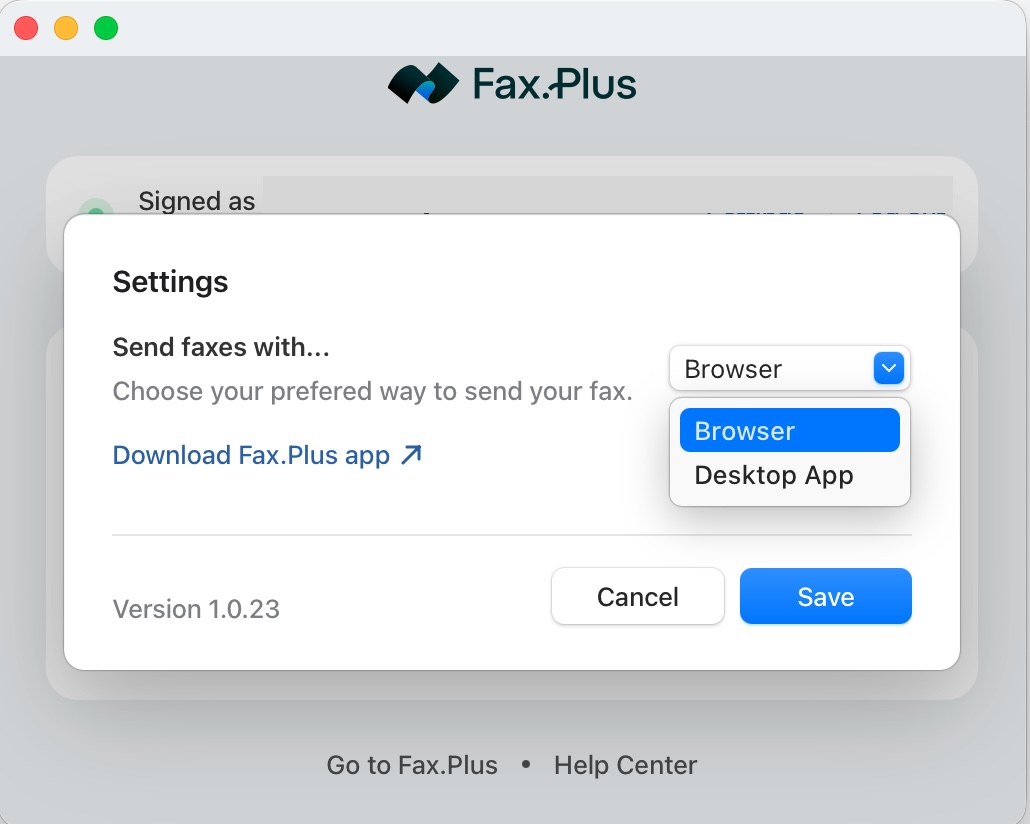
Fax.Plus also offers desktop print-to-fax functionality, allowing supported applications to send documents through a familiar print dialog. This is particularly convenient when working with documents that would otherwise need to be exported and uploaded manually.
Scheduled Faxing, Multiple Recipients and Document Tools
Scheduling lets users prepare a fax in advance, while sending to multiple recipients can reduce repetitive administrative work. Cover sheets provide useful context for recipients, and document organization tools help keep records manageable. Users who need electronic signatures can also explore Alohi’s separate Sign.Plus product.
Integrations and Fax API
Fax.Plus offers integrations for Google and Microsoft workflows, Slack and Zapier. Availability depends on the subscription: Slack is included at Business level, while the Enterprise plan includes Zapier and the developer REST API. The API can help organizations incorporate fax transmission and delivery tracking into their own software, including suitable document management or healthcare systems.
AI Text and Data Extraction
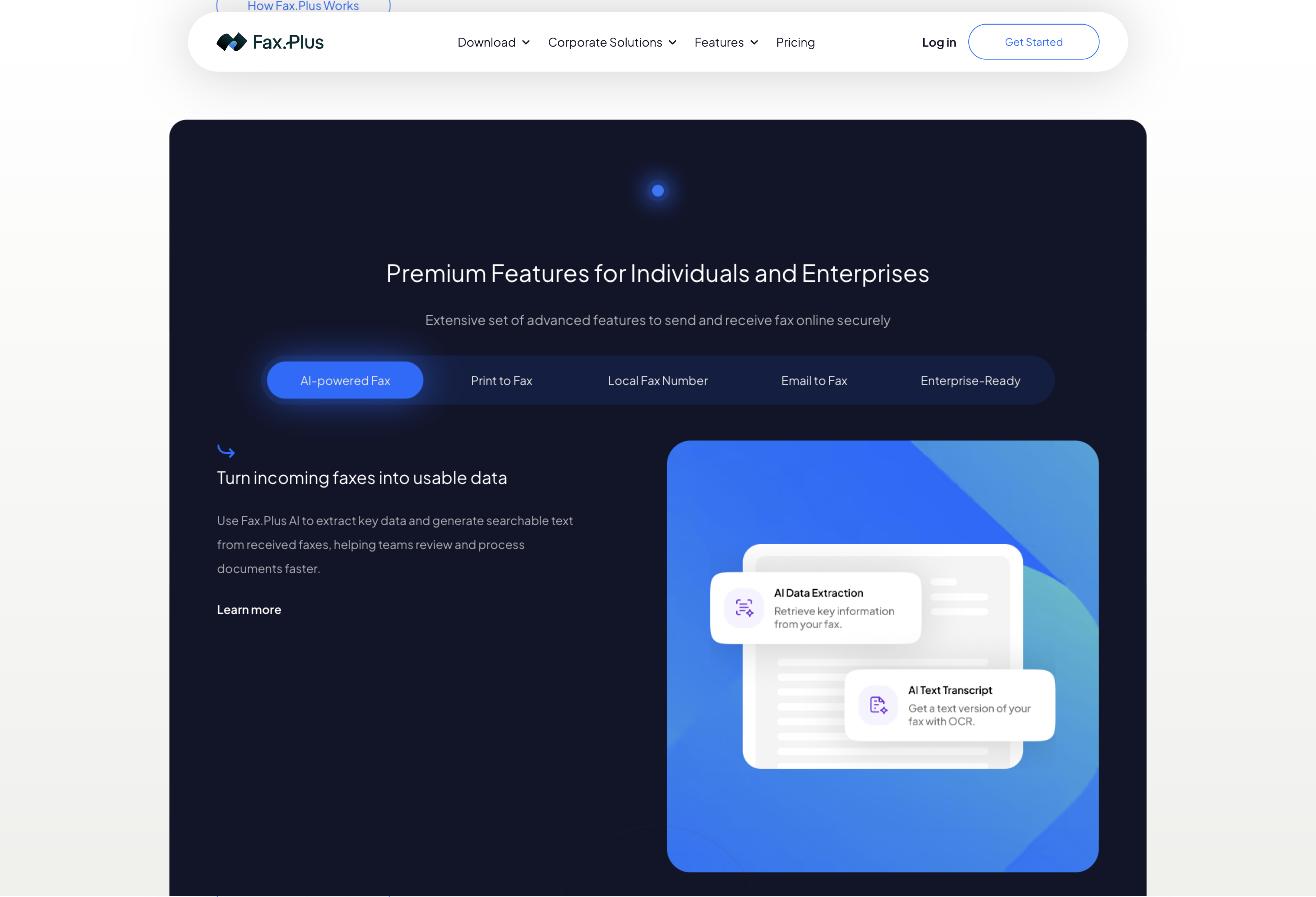
Enterprise subscriptions include Alohi AI credits for text transcription and data extraction. These tools can reduce the amount of manual transcription needed when processing incoming documents, particularly forms and records that contain recurring information. Extracted information should still be checked before it is used in important business decisions.
AI Assistant Integration (MCP)
A newer addition is the Fax.Plus MCP server, which connects compatible AI assistants such as ChatGPT and Claude to a user’s fax account. Rather than opening the fax dashboard for every task, users can request actions in natural language, including checking incoming faxes, submitting documents and retrieving delivery reports.
Fax.Plus currently makes MCP available on paid plans from Basic upwards. The AI application must support the connection, and account permissions determine the available actions. Accounts with Advanced Security Controls, including HIPAA and PHIPA configurations, are excluded. Businesses should review their AI provider’s privacy policies and confirm delivery independently of submission.
Fax.Plus Security and Compliance
Fax.Plus describes its security framework as including AES-256 encryption for stored data and encrypted connections for data in transit. Alohi also lists ISO 27001 and SOC 2 Type II among its security credentials. These measures are useful for organizations that need formal information security controls, although no service can eliminate every risk associated with document transmission.
US healthcare organizations that need HIPAA-compliant fax workflows must choose an eligible Enterprise plan, configure the necessary security controls and execute a Business Associate Agreement (BAA). Enterprise also provides data residency options and single sign-on. Organizations should confirm their own regulatory obligations and verify the configuration before sending sensitive information.
Fax.Plus Pricing and Subscription Plans
Fax.Plus offers a free sending option and four paid subscription tiers. The following indicative USD prices are based on the advertised annual-billing rates; taxes, local currency, additional numbers and destination-specific charges may affect the total. Check the official plans and sending rates before subscribing.
Free Plan – $0
A limited sending allowance is useful for occasional faxing or evaluating the service. A dedicated number for receiving faxes is not included.
Basic – $6.99 per month
Includes 200 monthly pages, one user and one fax number. Additional pages are listed at $0.10 each, with a limit of 60 pages per fax. Suitable for individuals with modest recurring requirements.
Premium – $13.99 per month
Includes 500 monthly pages, one user and one number, with additional pages at $0.07 each. Adds eligible number porting, toll-free number options and CSV fax-log exports. The maximum is 90 pages per fax.
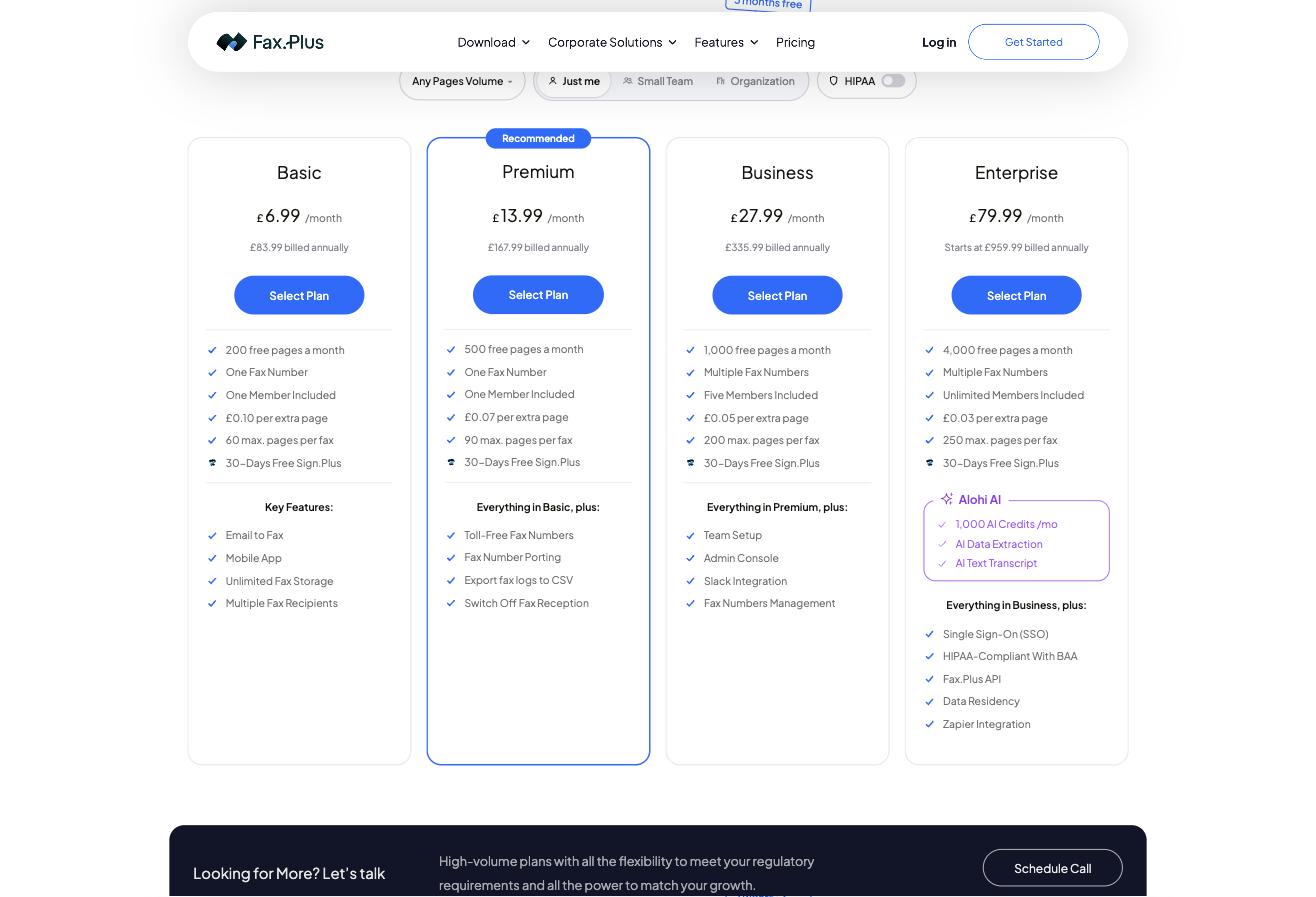
Business – $27.99 per month
Includes 1,000 monthly pages and five team members, with additional pages at $0.05 each. Adds team and fax-number management, an administration console and Slack integration. Supports up to 200 pages per fax.
Enterprise – from $79.99 per month
Starts with 1,000 or more monthly pages and unlimited team members. The advertised additional-page rate starts at $0.03, and the maximum is 250 pages per fax. Enterprise adds API access, Zapier, data residency, single sign-on, eligible HIPAA/BAA support and 1,000 monthly AI credits. Higher-volume configurations are available through the sales team.
One important detail is that certain international destinations count a transmitted page as multiple allowance pages. If you fax internationally or expect significant overages, compare the total projected cost rather than just the subscription price.
Ease of Use
Fax.Plus follows a familiar inbox-and-outbox approach. The browser interface and mobile apps reduce the need for equipment and make it possible to handle documents remotely. For everyday users, the core workflow consists of attaching a file, entering the number and reviewing the transmission status. More advanced integrations and compliance configurations will require additional setup.
Customer Support
Alohi maintains a Help Center with setup guides, troubleshooting articles and product instructions. Developers can also consult the API documentation. Businesses considering a high-volume or regulated deployment can contact the sales team to discuss their requirements. Support entitlements should be checked for the selected subscription.
Fax.Plus Pros and Cons
Pros
- No physical fax machine or dedicated line required.
- Mobile, browser and email faxing, plus desktop print integration.
- Dedicated numbers and eligible number porting.
- Business administration, security controls and developer integrations.
- AI-assisted document processing and optional AI assistant connectivity.
Cons
- Receiving faxes requires a paid subscription.
- HIPAA/BAA support and the developer REST API require Enterprise.
- International destination multipliers and page overages can increase costs.
Who Should Use Fax.Plus?
Fax.Plus is particularly relevant to remote teams, professional offices, healthcare organizations with appropriate compliance configurations, and businesses that need to maintain existing fax numbers without dedicated hardware. Occasional users who only need to send a few pages may find the free option sufficient, while teams should compare the administration and integration features of Business and Enterprise.
Final Summary
Fax.Plus offers a practical way to replace traditional fax equipment with a cloud-based service. Its combination of mobile access, dedicated numbers, flexible plans, security features and integrations makes it a compelling option for individuals and businesses that still rely on fax communications.
The newer AI features add an interesting dimension for teams looking to automate document workflows. However, the most suitable subscription depends on sending volumes, receiving requirements, international destinations and any applicable compliance obligations. For businesses with recurring fax requirements, Fax.Plus is well worth considering.